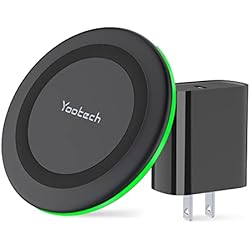
A flashing green light on a Yootech wireless charger means the charger is not successfully charging your device. A solid green means it is ready and working. Flashing green is the charger’s way of signaling that something is interrupting the connection between the pad and your phone.
Here is what causes it and how to fix it.
What the Green Light Patterns Mean
A moderately flashing green light typically means the charger is attempting to charge your device, while a rapidly flashing green light indicates the charger is experiencing an issue. A solid green light means the charger is plugged in and ready to use.
Common Causes
Phone Is Not Aligned on the Pad
Your smartphone may not be properly centered on the charging pad. Repositioning the device to ensure proper alignment is the first thing to check. Yootech pads have a single charging coil, so placement matters more than it does on multi-coil competitors.
Something Is Between the Phone and the Pad
A flashing green light can indicate the presence of a foreign object — such as metal or magnetic items — between the charger and your device. Wireless chargers use a magnetic field to transfer power, and objects interfering with that signal will interrupt charging. Credit cards, PopSockets with metal plates, and magnetic phone cases are common culprits.
Phone Case Is Too Thick or Has Metal
You can use a Yootech wireless charger with a phone case as long as it is not too thick (less than 5mm) and does not contain any metal or magnetic materials. Cases beyond that thickness block the Qi signal.
Wrong Power Adapter
Using an incompatible power adapter is one of the most common causes of the blinking green light. The charger should be properly connected to a working power source such as a QC 2.0 or 3.0 adapter, with the USB cable securely connected. Using a cheap 5W phone charger block instead of a proper Quick Charge adapter is a very frequent cause of this issue.
Device Incompatibility
The blinking green light can also indicate that the charger is not truly compatible with your device. If compatibility is the issue, there is nothing you can do to fix it. Yootech chargers use the Qi standard, so any non-Qi device will trigger this behavior.
How to Fix It — In Order
Step 1: Reposition Your Phone
Remove the phone completely, wait two seconds, and place it back centered on the pad. Look for the sweet spot near the Yootech logo.
Step 2: Remove the Case
Take your case off and try charging the phone bare. If it works without the case, the case is the problem.
Step 3: Check for Metal Objects
Remove any ring holders, PopSockets with metal bases, or magnetic mounts attached to your phone. Clear any coins or cards off the pad surface.
Step 4: Swap the Power Adapter
If you are using a wall outlet, try a different outlet. If you are using a power bank or external battery, make sure it has sufficient charge. Swap the adapter block for a proper Quick Charge 2.0 or 3.0 adapter delivering at least 9V/1.67A for 15W pads.
Step 5: Try a Different Cable
The USB-C or Micro-USB cable connecting the pad to the adapter is often overlooked. Replace it with a known-good cable and test again.
Step 6: Contact Yootech Support
If you have tried all of the above and the blinking green light persists, there may be an issue with the charger itself. Contact Yootech’s customer support for assistance. Their warranty period is typically 18 months and they are generally responsive to replacement requests.
Quick Reference
The vast majority of flashing green cases on Yootech chargers come down to three things: the phone is off-center, the case has metal in it, or the wrong power adapter is being used. Fixing any one of those three resolves the issue in almost every reported case.